What is Slack Code? Slack's AI code channels
Helio Team
Slack Code puts AI coding agents into dedicated Slack channels with diffs, live previews and a shared plan. What it does, what it costs, and where it stops.
The short answer
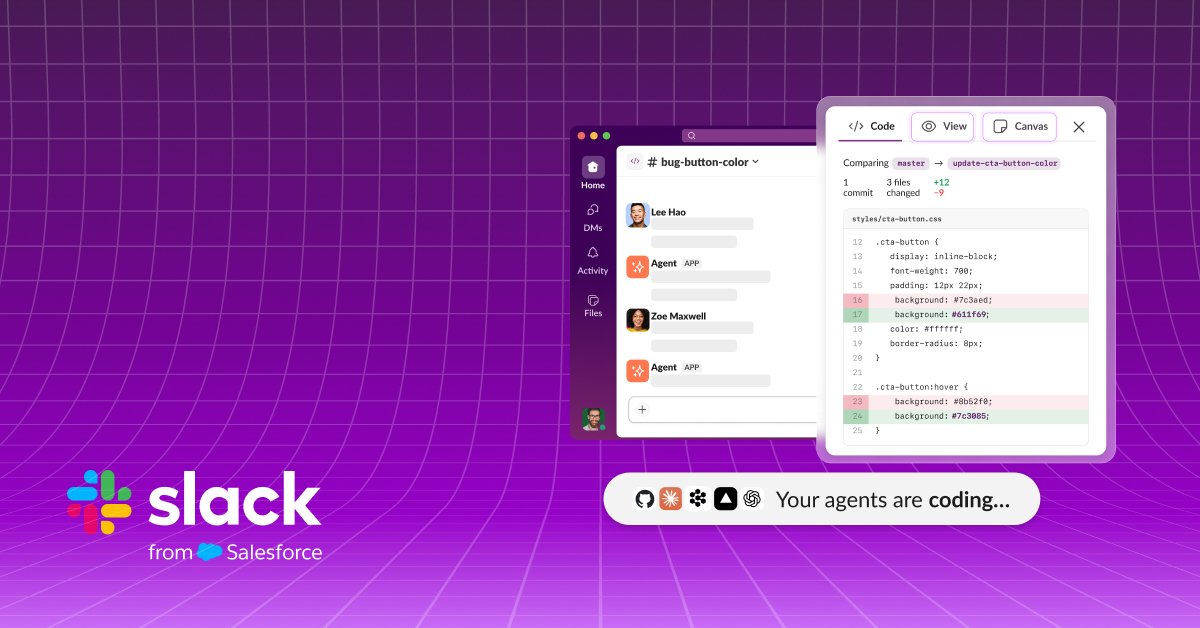
Slack Code is a Slack surface, announced on 21 August 2026, that gives AI coding agents a channel to work in instead of a private terminal.
You tag a coding agent from any conversation. Slack spins up a project-specific code channel, and the work happens where your team can see it: the running plan, the code diffs, a live preview of what was built. When the task is finished, the channel archives itself and the record stays searchable.
Slack is not shipping its own coding agent here. It is shipping the room the agents work in.
What happens when you tag an agent?
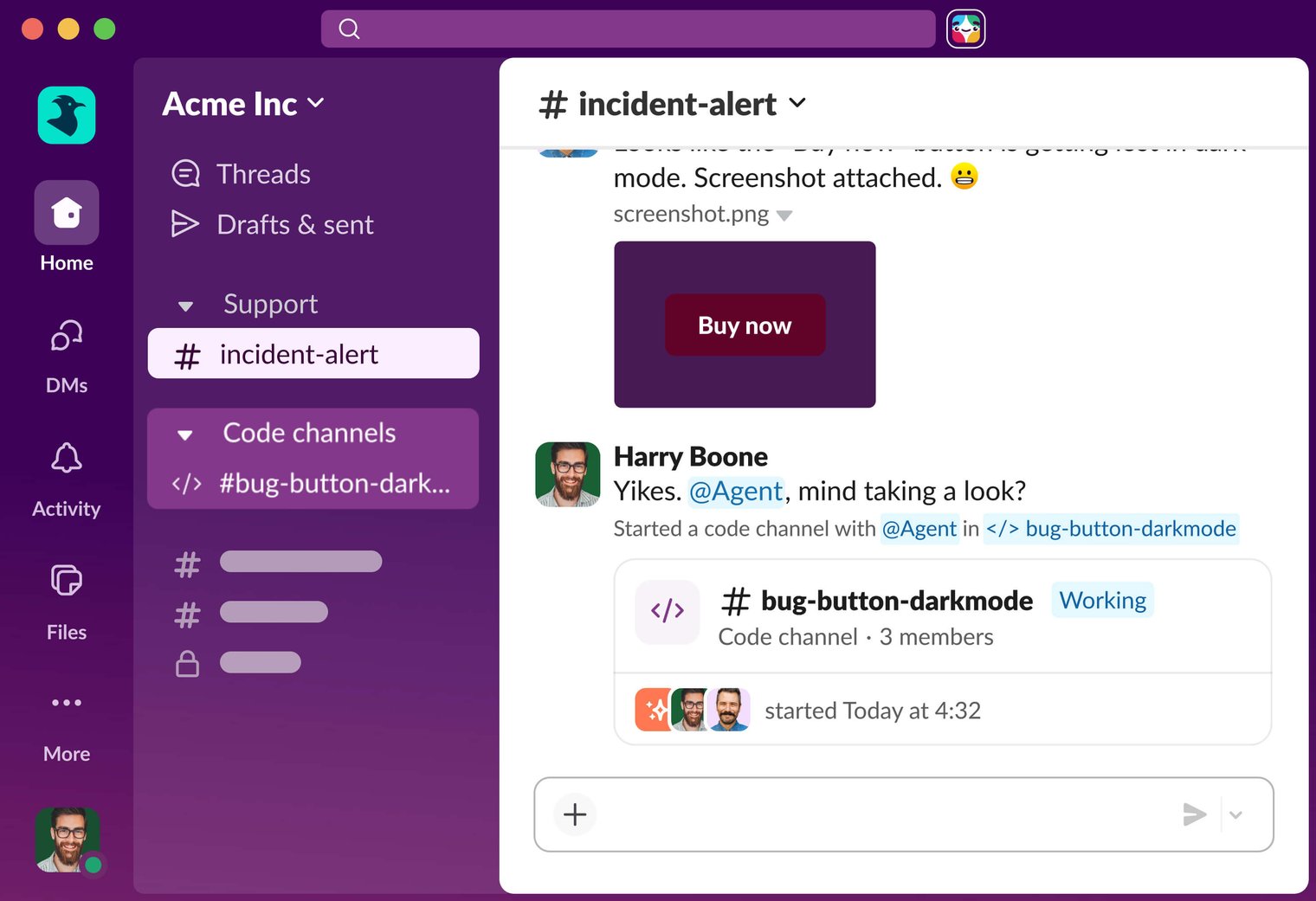
This is the part worth seeing rather than reading about. Somebody hits a bug in an ordinary channel and mentions a coding agent in the thread. Slack does not answer inline. It creates a code channel named for the job, marks it Working, and moves the whole exchange in there.
The original channel keeps a card pointing at the new one, so the thread that raised the bug still tells you where the work went.
What lives inside a code channel
A code channel reshapes itself around the task rather than being a plain message list.
- A plan tab, showing the steps the agent intends to take before it takes them.
- A diff tab, showing changed lines the way a pull request would — old lines struck through, new lines added.
- A live preview tab, showing the running output rather than a description of it.
- A canvas the agent can write into, so the reasoning behind a fix survives as a document rather than scrollback.
- An Agents tab, workspace-wide, listing every agent and every session with status, naming, and a stop button.
Note what the container holds and what it does not. Everything above belongs to the task. In Helio the equivalent state belongs to the teammate instead — its memory, its lane, its standing jobs survive any individual piece of work, because there is no channel to close.
Can you interrupt it mid-task?
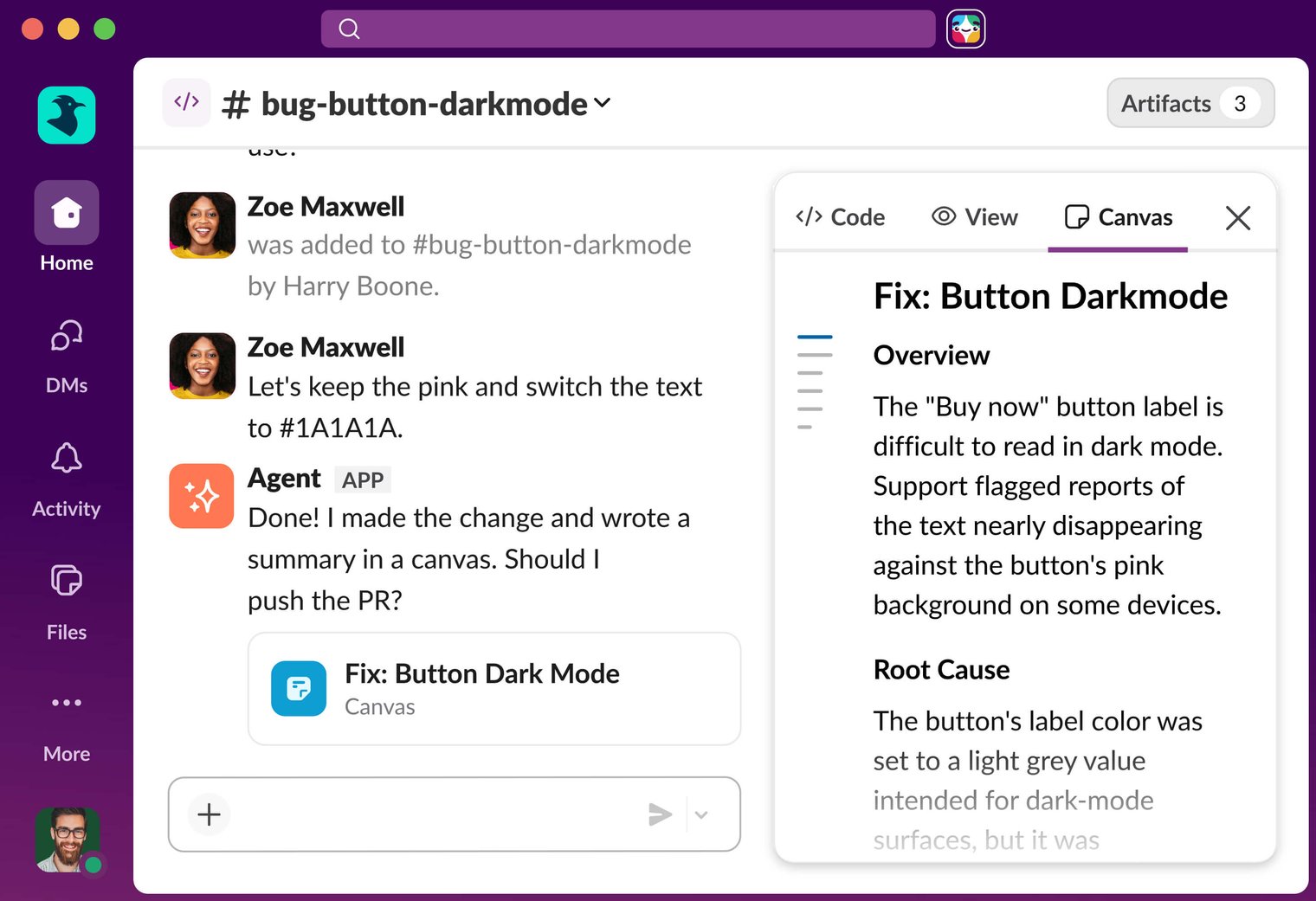
Yes, and this is the design's actual argument. Because the work sits in a channel, anyone in that channel can intervene while it is still happening: flag a constraint before the agent commits to it, catch a bug before it ships, pause the agent, or redirect it. A designer can drop in an asset partway through and the agent picks it up.
The screenshot below is the shape Slack keeps showing, and it is the honest sales pitch: a second person gets pulled in, makes a call the agent could not make, and the agent still asks before pushing the pull request.
Which agents does it work with?
Slack Code is agent-neutral by design, which means the choice of coding agent stays yours and so does the bill. Pricing below comes from each vendor's own pages as of August 2026.
| Agent | What it is | Pricing |
|---|---|---|
| Claude | Anthropic's coding agent, also usable in terminal, IDE and web | No standalone price; bundled into Claude Pro $20/mo, Max $100 or $200/mo |
| Devin | Cognition's autonomous agent, works in its own cloud sandbox | Free tier, Pro from $20/mo, Teams $80/mo plus $40/seat |
| GitHub Copilot | Coding agent tied to the GitHub review workflow | Free tier, Pro $10/mo, Business $19/user/mo |
| Vercel Agent | Deployment-aware agent and PR reviewer | On demand: provider tokens at cost plus $0.25 per million tokens |
| ChatGPT | Listed by Slack as coming soon at launch | Not yet available in code channels |
What does Slack Code cost?
The code channels themselves are available on any Slack plan at launch, at no additional charge. What you do need is your own access to whichever partner agent you want to run.
So the pricing question is not really what Slack Code costs. It is what the agents you are about to invite into it cost, and that number scales with how many people are running them.
For comparison, since we are about to be on a list you might be pricing: Helio starts free with 1,000 credits and no card, then $16 a month billed annually, with the per-credit rate on the pricing page.
How do permissions work?
Slack's stated approach is that agents in code channels inherit the workspace's existing permissions and admin controls, so IT does not have to configure or audit a new system.
- An agent acts with the permissions of the person who invoked it. There is no bot-level god mode that sees everything.
- Devin, for its part, runs in isolated sandboxes with minimum viable access.
- Nothing about the channel replaces your repository's review process — teams can still require human sign-off before anything merges to production.
The shared-identity question is worth asking of any of these products: each Helio teammate gets its own dedicated Slack app rather than sharing one bot identity, so the log names the teammate that did the work rather than a generic app.
Why did Slack build this?
The pitch is that AI coding has become invisible work. Most sessions today are one person and one agent in a terminal, and nobody else on the team sees the reasoning, the intermediate steps, or the moment the agent went sideways.
Slack's interim CEO Rob Seaman framed the shift bluntly: code is no longer the bottleneck, and ideas, taste, judgment and craft are. VP of Product Katie Steigman positioned the multiplayer aspect as quality control specifically — people can see your work, and people can comment on your work, which is a guard against AI slop.
There is a number behind it. Cognition, one of the launch partners, reported a 10x increase in merged pull requests while headcount grew only 40 percent. When generation gets that cheap, reviewability becomes the binding constraint.
Worth separating two things that get bundled here, though. More eyes on a diff is a review problem, and Slack solved it. Deciding which work is worth starting at all is an ownership problem, and a channel does not touch it — which is the half Helio is built for.
What Slack Code is not
Three limits are worth being clear about, because the name invites all three misreadings.
- It is not an agent. It has no model of its own and does nothing until you bring one.
- It is not Claude Code. Slack Code is the channel; Claude Code is one of the agents that can work inside it. The names are one word apart and the products are at different layers.
- It is not a general work surface. A code channel is built around diffs and previews, not inbox triage, customer research or a weekly report.
Where Helio fits, and where it does not
That third limit is the interesting one. Inbox triage, customer research, a weekly report — none of it fits inside a code channel, and that gap is what Helio is built for. Read what follows as the interested party talking: it is on the Slack Code alternatives list for three reasons that are easy to check.
It works in Slack too, which is the part people assume it does not. A Helio teammate gets its own dedicated Slack app, posts into your channels, and answers when you mention it — so it is not a trade of your team's habits for a second place to look.
The model is yours to pick. Inside a code channel you are locked to whichever agent you tagged, and its model choice with it. In Helio each teammate carries its own profile — a name, a role, and a model — and you can bring your own Anthropic, OpenAI or DeepSeek keys rather than take what the room offers.
And the scope is wider than a diff. A code channel is built for software; a teammate can own the weekly report, the inbox, or the deploy watch with the same identity and memory it uses for code.
Where it does not fit: if your team already pays for a coding agent and the only broken thing is that nobody sees the work until the PR lands, Slack Code fixes exactly that, for free, today. We are the answer to a different complaint — that the job comes back next week and you are still the one starting it.
Where it stops
The unit of work in Slack Code is a task. The channel spins up for a job and archives when the job is done. That is excellent for auditability, and it is a deliberate choice — but it means the thing that persists afterwards is a record, not an owner.
That gap is easier to see next to the other product people compare it with. Claude Tag put a proactive @Claude into Slack threads two months earlier and made the opposite bet: it accumulates channel context and can act without being prompted. One documents, the other remembers. We wrote up the full contrast in Slack Code vs Claude Tag.
Neither answers the third question. Visibility tells you what an agent did. It does not tell you who is responsible for the weekly report on Monday, the backlog item nobody picked up, or the inbox — which for most small teams is the larger share of what needs doing, and most of it is not code. That is the job Helio is built for, and if you are weighing the two directly, Slack Code alternatives puts us on the list next to seven other options.
Frequently asked questions
What is Slack Code?
Slack Code is a Slack surface announced on 21 August 2026 that gives AI coding agents a dedicated channel to work in instead of a private terminal. Tag a coding agent from any conversation and it opens a project-specific code channel carrying the running plan, code diffs and a live preview, then archives itself into a searchable record when the task is done.
Is Slack Code free?
The code channels are available on any Slack plan at no additional charge. You supply your own access to whichever partner agent you run, so the real cost is the agent subscription — a Claude, Devin or Copilot plan — not Slack Code itself.
Which AI agents work with Slack Code?
At launch Slack Code works with Anthropic's Claude, Cognition's Devin, GitHub Copilot and Vercel's agent, with OpenAI's ChatGPT listed as coming soon. Teams can also bring custom agents built on platforms such as Lovable, n8n and LangChain.
Is Slack Code the same as Claude Code?
No. Slack Code is the channel and has no model of its own. Claude Code is Anthropic's coding agent and is one of the agents that can work inside a Slack code channel. The names are similar; the products sit at different layers.
Does Slack Code replace pull request review?
No. Agents in code channels inherit your Slack permissions and act with the invoking user's access, and your repository's own review process still applies. Teams can require human sign-off before anything merges to production.
Is there a Slack AI that does more than coding?
Yes. Helio ships each AI teammate as its own dedicated Slack app, so it posts and answers in your channels the same way an agent in a Slack code channel does. The difference is scope: a code channel is built around one diff and closes when the task ships, while a Helio teammate keeps its identity and memory across jobs — coding, the weekly report, inbox triage, a deploy watch — and is still on it the following week.