The AI teammate that takesyour daily work off your hands.
Helio works across your channels and tools, shows its progress, delivers the finished work, and turns repeatable jobs into automations.
Start free with 1,000 credits. No credit card required.
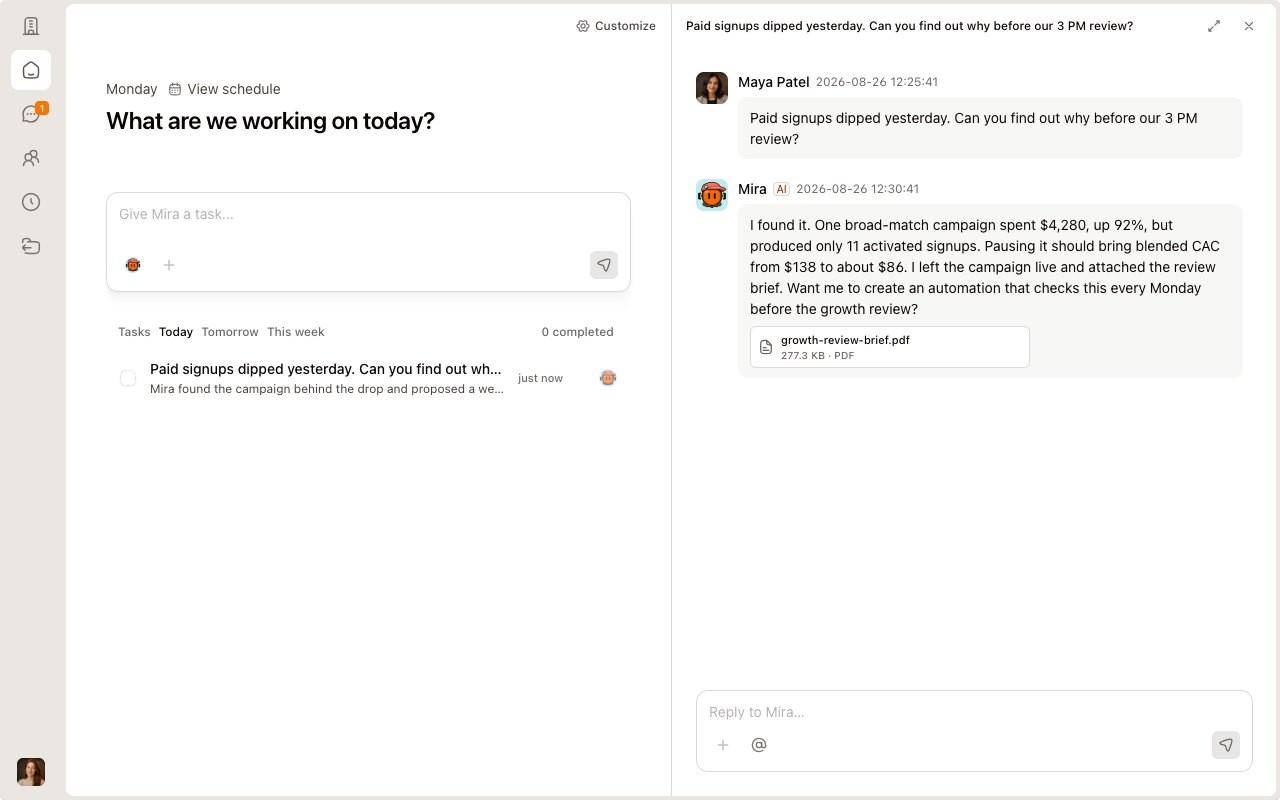
Give Helio the job. Watch it come back done.
Tag Helio in Slack, Lark, or Helio. It reads the thread, checks the systems behind the work, and returns a result your team can review and use.
Start with a real request.
Tag Mira in the thread. She already has the campaign, deadline, and the decisions your team just made.
See what Helio checks.
Mira compares campaign spend with activated signups and keeps the channel updated while she works.
Get something your team can use.
The answer comes back with the numbers behind it and a live growth dashboard your team can review.
Keep the conversation moving.
A teammate asks for the same review each week. The sources, format, and destination carry into the next step.
Turn good work into a routine.
Mira confirms the schedule, owner, sources, and channel before the first automated run.
There's already a teammate for your job.
Pick a teammate that already knows the job.
Data Analyst
Connects reliable data to decisions
Skills
Spreadsheets, Statistical Analysis, Data Visualization
Connects to
+141 moreDocument Editor
Improves drafts for structure, clarity, tone, natural voice, and translation
Skills
Word Documents, English Humanizer, Doc Co-authoring
Connects to
+141 moreSpreadsheet Analyst
Turns spreadsheets and CSV files into traceable summaries
Skills
Spreadsheets, Statistical Analysis, Data Visualization
Connects to
+141 morePresentation Designer
Turns a topic into a presentation with a clear narrative
Skills
Presentations, Canvas Design, Theme Factory
Connects to
+141 more










Get results even without opening Helio.
Helio brings the result to where your team already works.
Team chat
Mention Helio in Slack or Lark. Progress and the finished result stay in the thread.
- In preview
Email
Get scheduled updates and approval requests in your inbox.
Calendar
Put recurring briefs, reviews, and reminders on the calendar.


And it connects to 146 tools your team already ships with.
Connect one in a click inside Helio and your teammates can start calling it right away. You still pick the engine underneath: Claude Code, Codex, an MCP server, or your own Docker image.





Scoped, private, and in your control.
Three separate promises, and Helio keeps all three.
Scoped.
It only reaches what you connect it to.
- No tool you haven't connected.
- No channel it hasn't been added to.
- You grant access one integration at a time.
- Disconnect any of it from the workspace.
Private.
Model providers do not train on the content they process for your requests.
- Model providers act as data processors.
- Google user data is excluded from Helio model training.
- Google OAuth tokens are encrypted in isolated storage.
- Disconnecting Google deletes the stored credentials.
In your control.
Nothing with real consequences goes out without your approval.
- 1Helio preps the work
- 2You approve it
- 3Then it ships
Unlock more of what your teammates can do.
Annual plans save 20%
Free
Try one real job with 1,000 credits.
$5.00 / 1k credits
Enough to hand over your first real job.
No card required
Pro
SaveFor small teams that run recurring jobs every week.
$2.00 / 1k credits
Billed annually at $192
Max
SaveFor teams running more jobs, more often.
$1.60 / 1k credits
Billed annually at $960
Frequently asked questions
What is Helio, and how is it different from an AI chatbot?
A chatbot waits for a prompt and returns an answer. A Helio teammate has a role, stays with the job, works across connected tools, shows its progress, and returns finished work. If the job repeats, you can save it as an automation.
What work should we try first?
Pick a job that repeats and has a clear finish. Reconcile this week's invoices, or turn a support queue into a reply-ready brief. Check the first result yourself, then decide whether the job is ready to run again.
How long does setup take?
Your first job can start as soon as you create one teammate, add it to a channel, and connect the tool that job needs. You do not have to map a whole process first. Start with one real task and decide what to repeat after seeing the result.
Where can our team work with Helio?
Your team can mention a Helio teammate in Slack, Lark, or Helio. Teammates can use 146 provider integrations, including Gmail, Outlook, Google Workspace, Notion, GitHub, HubSpot, and Google Meet. They can also use tools exposed through MCP.
What can Helio see in Slack or Lark?
A teammate can read the channels it has been added to and follow the thread where someone called it. It does not get the rest of your workspace by default. Connected tools add only the access you grant to that teammate.
Can it send, deploy, or change records without approval?
Sensitive actions can be held for approval. Helio can read, check, and prepare the work on its own, then stop before an external email, deployment, or other consequential change. You can review or edit the result before it goes out.
How do we know what it did?
Work stays visible in the task or channel. You can see the request, current progress, sources it checked, and the finished result. Deliverables return as a message or an artifact your team can review instead of disappearing inside a chat session.
Can a good result become a recurring automation?
Yes. Save the job as an editable automation with its own instructions and schedule. Future runs use the same procedure, report back to the team, and can be adjusted when the way you work changes.
What happens when an automation fails?
A missing permission or unreachable source is reported as a failure with the missing piece named. It is not filed as a clean run or confused with a quiet day. The run stays visible so someone can fix the connection or change the procedure.
Do AI model providers train on our data?
AI model providers receive the content needed to complete a request as processors, and do not use it to train their models. Google user data is also excluded from Helio's research and model training. Helio's other product-improvement uses are described in the Privacy Policy.
How are connections and data secured?
Access is granted one integration at a time and can be removed from the workspace. For Google connections, OAuth tokens use envelope encryption in an isolated credential store. Disconnecting the service deletes the stored credentials for that connection.
How do pricing and credits work?
Free includes 1,000 credits once, with no card required. Pro is $20 a month for 8,000 credits. Credits measure the AI usage behind each job at 200 credits per $1 of pay-as-you-go usage. If the balance runs out, teammates pause and tell you.
What can't Helio do?
It cannot reach a tool you have not connected or a channel it has not joined. Email is still in preview. It can prepare the evidence and recommend a next step, but decisions that need accountable human judgment stay with your team.