What is Grok Bot? xAI's named agents, explained
Helio Team
What is Grok Bot? xAI's named AI teammates, each owning one job and sharing their member's cloud computer. What it does, what it needs, and where it stops.
The short answer
Grok Bot is xAI's named-agent product. You create Bots, give each one a short name, one primary job, and a description of how it should work, and then message it like a teammate.
A Bot is not a chat session. It keeps memory, files, browser sessions and preferences across turns, so context compounds instead of resetting. xAI's own framing is that a Bot should own a repeatable outcome rather than a loose category of questions.
It is a different product from Grok, the chat assistant most people mean when they say the name.
How it works
Four pieces, and the second is the one that makes it unusual.
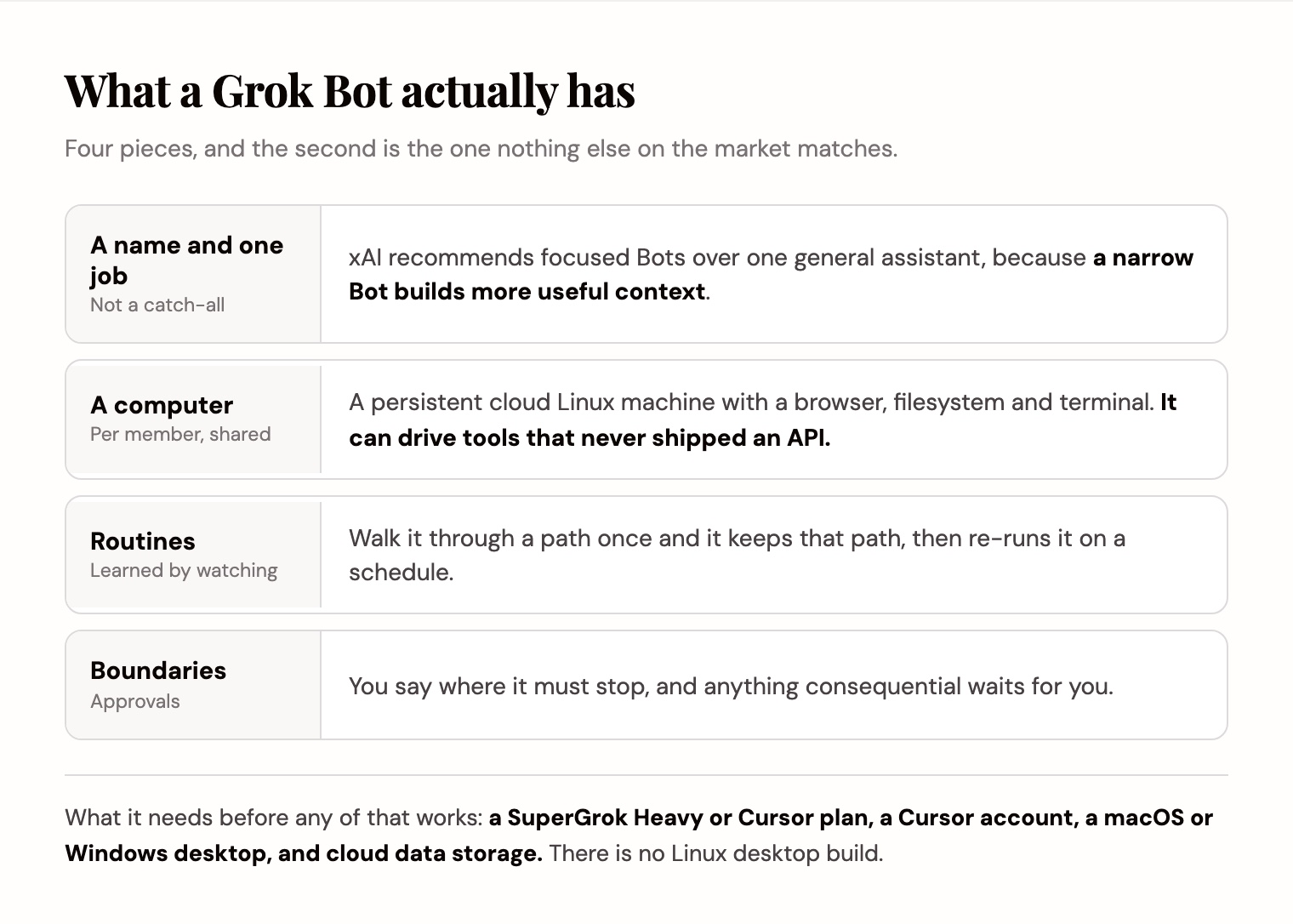
- Bots. Named, persistent agents with one job each. xAI recommends focused Bots over one catch-all, because a narrow Bot builds more useful context.
- A computer. Each member gets one persistent cloud Linux machine with a browser, filesystem and terminal. All of that member's Bots share it, so files and sign-in sessions carry between them.
- Routines. Walk a Bot through a multi-step path once and it keeps that path, then re-runs it on a schedule or on demand.
- Approvals. You set explicit boundaries in the request, and consequential actions stop and wait rather than proceeding.
What the computer is actually for
This is the part worth understanding, because it is the whole reason the product has a desktop app instead of living in a chat tool.
Most agent products reach your tools through connectors. If a tool never shipped an API, or your team uses an internal system nobody wrote a connector for, a connector-based agent simply cannot touch it.
A Bot with a real browser can sign in and act the way a person would. That covers most internal software and a good share of the web.
This is a real gap between Grok Bot and most of the market. Helio sits partway: a teammate can drive your paired Chrome browser, so a website with no API is not out of range, but the browser is yours rather than an always-on machine the Bot owns. An always-on machine that comes with the member's seat is still the strongest single reason to pick Grok Bot over anything on this page.
What you need to run it
More than most people expect, and worth checking before you plan a rollout.
- An eligible plan: SuperGrok Heavy, Cursor Ultra, or Cursor Teams Premium, per the setup guide.
- A Cursor account, because that is what Grok Bot signs in with. For most teams this is a second vendor relationship.
- An app to drive it from: macOS or Windows on desktop, or iOS. There is no Linux desktop build.
- Cloud data storage enabled. Accounts on Legacy Privacy Mode have to move before Grok Bot will start.
What people use it for
xAI's own examples are all framed as ownership rather than as questions, which tells you the intended shape.
A sales Bot owns account research, contact prioritisation and review-ready outreach, and stops at a review list rather than sending anything. A talent Bot owns sourcing and outreach drafts without contacting anyone. A paid media Bot owns campaign monitoring and budget recommendations, and keeps the actual budget changes behind approval.
The pattern in all three: start with read-and-prepare work, review the output until it is reliable, then add approved actions or a routine. That is sound advice for any agent product, including ours.
Where it stops
None of these are about how well it works.
- Clients cover macOS, Windows and iOS; there is no Linux desktop build.
- It is gated behind SuperGrok Heavy, Cursor Ultra, or Cursor Teams Premium, so the cost question starts at a subscription you may not already have.
- Neither xAI nor anyone else has published a rate for what running Bots costs on top of that plan.
- The computer, files, sessions and access belong to a member rather than a team. Your Bots are yours.
- Almost nothing independent has been written about it yet, so there is very little to check the documentation against.
- None of these are unique failings. Helio has no computer of its own and no published independent testing either, and we say where that leaves us below.
The limit that matters most
The last one on that list is not a missing feature. It is a design decision, and it decides who the product is for.
xAI's documentation for teams is explicit: files, sign-in sessions and access belong to the member, not to an individual Bot. Each person gets their own computer and their own Bots.
That is coherent, and for a personal AI team it is the point. It also means a colleague cannot pick up a job your Bot has been running for a month, the work does not appear anywhere they can see it, and when you leave, it leaves with you.
That is the gap we build for, so weigh what follows accordingly. Helio is a workspace where AI teammates own recurring work: you give one a name, a role, and a job that comes back, and it picks that job up on its own schedule and delivers the result. It runs in Slack as well as its own channels.
The memory attaches to the job rather than to the person, and the job sits in a workspace your colleagues are in. Same idea of a named teammate that owns an outcome, different answer to who owns the teammate.
We do not have the computer, and we do not learn a workflow by watching. If those are why you are here, Grok Bot is the better buy and this article is not trying to change that.
What we have instead is the part that decides whether a job is actually handed over. A named AI teammate owns a recurring job, keeps its memory across every run, works in your Slack channels next to the people who care about the result, and delivers the weekly report because it is Monday rather than because you remembered. It starts free with 1,000 credits and no card, which makes one recurring job the cheapest way to see whether the difference matters to you.
Hand it one job that comes back →
If you would rather see the field first, we lined up seven options in Grok Bot alternatives and compared it to Anthropic's answer in Grok Bot vs Claude Tag.
Frequently asked questions
What is Grok Bot?
Grok Bot is xAI's named-agent product. You create Bots, each with a short name, one primary job, and a note on how it should work, then message them like teammates. Each Bot keeps memory, files and browser sessions across turns, and every member gets a persistent cloud Linux machine with a browser, filesystem and terminal that their Bots share.
Is Grok Bot the same as Grok?
No. Grok is xAI's chat assistant. Grok Bot is a separate product built around named, persistent agents that own a job and act on their member's cloud computer. Different surface, different purpose.
What do I need to use Grok Bot?
An eligible plan (SuperGrok Heavy, Cursor Ultra, or Cursor Teams Premium), a Cursor account to sign in with, an app to drive it from (macOS, Windows or iOS), and cloud data storage enabled. Accounts on Legacy Privacy Mode have to move first.
Does Grok Bot run on Linux?
Not as a desktop client. Grok Bot ships for macOS and Windows, plus iOS. The Bots themselves run on a managed Linux virtual machine in the cloud, but the app you drive them from is not available on Linux desktops.
Can Grok Bot use software that has no API?
Yes, and it is the main reason to choose it. Each member's Bots share a cloud machine with a real browser, so a Bot can sign in and act inside a website the way a person would, rather than being limited to whatever has a connector.
Can my team share Grok Bots?
Each member gets their own computer, and xAI's documentation says files, sign-in sessions and access belong to the member rather than the Bot. Bots can coordinate inside one member's scope. If you want the work itself to live somewhere the whole team can see and pick up, that is a different shape of product, which is what Helio builds.